What is Scoir
As the college Admissions Network, Scoir brings your whole support team together on one platform, helping you identify your talents, find your college fit, and apply with confidence.

As the college Admissions Network, Scoir brings your whole support team together on one platform, helping you identify your talents, find your college fit, and apply with confidence.

If you’re a student using Scoir with your high school, this guide is for you. We’ll walk you through the process of applying with Scoir as a first-time college applicant, along with some best practices for making the most of the Network.

Having an account that's linked with your high school allows you to collaborate with your counselor through your college search and application process.
If you've already created a free Scoir account, make sure to link your account before moving forward!
When you're ready to begin applying to colleges with Scoir, the following information in My Profile will be used to pre-populate your Application Profile:
Personal info
Family info
High school and college info
Test scores (where applicable)
 Don't worry! You'll have the opportunity to edit this information before submitting any college applications.
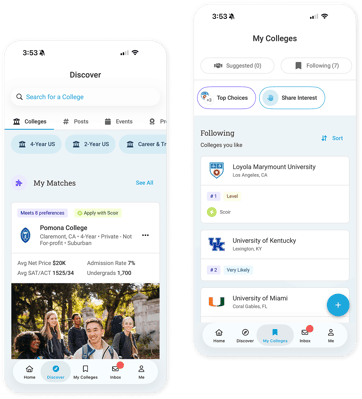
Explore College Profiles and search for virtual tours right in Scoir! You can also view college visits to your school, college programs, and other events. Find a school you like? Give it a Follow to save it to My Colleges.
Don't forget to use the College Compare tool to compare up to 4 colleges side-by-side.

Colleges on your list can send you messages so you can learn more about them. We don’t share any personal information about you…colleges will just know someone is interested but not you specifically.
Every time a college you’re Following schedules a visit with your school via Scoir, you’ll receive a notification. That way, you won't miss a visit to the colleges that interest you most!
Here are some helpful resources on college list building to explore:

There's no bad time to start following colleges in Scoir! We encourage you to update this list regularly as your preferences evolve throughout your high school career.

If you’ve registered your account through the invitation that your high school sent you, you’re connected with your counselor!
This means you can direct message your counselor, receive college suggestions from them, and when you're ready to apply, coordinating your application materials will be a breeze.

As a safe, secure, student-centric college search platform, you must take action to invite a parent or guardian to link with you on Scoir. It’s totally optional, but can be a great way to collaborate on your college list!
You can invite a parent or guardian to link with you on Scoir, or they can register for their own account. It’s totally optional if you want to link with them, but it can be a great way to collaborate on your college list!

If you’re linked to a high school on Scoir whose settings allow for it, you can request teacher recommendations. Teachers can be an incredibly valuable resource when it comes time to request recommendations. You can do so via the My Colleges page.

Start the application process by completing your Application Profile. This can be used for any school you apply to through Scoir! Before applying, be sure to confirm the information in your Application Profile as you will not be able to edit this information once you’ve moved into step 2, answering a college’s supplemental questions.

Step 2 will take you outside of Scoir to answer a college's supplemental questions. You’ll be given an idea of how much you have left to complete before leaving Scoir. Once you're ready to submit, you'll provide payment (unless you have a fee waiver) directly to the college.
Note: You don't have to complete your application in one sitting. You'll be able to pause and resume where you previously left off.

Most colleges require you to submit at least one essay as part of your application. When you apply to a Coalition members school with Scoir, you’ll have the opportunity to review the available essay prompts from Coalition and enter your essay before moving on to the college-specific questions.

In addition to the personal essay, some colleges may also ask you to answer short questions or write a supplemental essay. We'll make sure you know about any supplemental work waiting for you, and then you'll complete these items on the college's application portal.
Note: You can view the essay prompts for a college by jumping to the Essay and More section.
Here are some additional college essay resources to check out: